CLS Beginners Guide
Some of you were so excited to get started you might have missed the basic instructions on our download pages. So we have made this supplemental beginners guide for you. If it’s missing something, fire us off a support email and let us know what it is, we will amend this guide for you, thanks!
Please use our search feature to search for any topics of interest, or type in any questions you may have as well. We require that you read the entire members area, each topic prior to contacting support to keep our staff from having to repeat the tutorial information by email.
Where do I start, there is so much information here!
Start right here folks. You need to upgrade your education, that’s why you’re here. Some people have little education, that’s why their on Craigslist. There can be a conflict right there some times. “we aren’t all computer pros like you guys, just give me a simple list of stuff I got to do” goes the complaint sometimes. Other’s say “I aint got all day do waste on all this reading”. And our official answer is: Do you know what your Craigslist problem is? They have programed their database robots to target people like this. People who are not computer pros, who have no patience, and frustrate easily. Don’t for a second think you will take out your frustrations on us. We will ban you if you disrespect us. (its in our terms) We didn’t make this for pushy uneducated jerks who want to just attack someone. When you’re in my class, you need to pay attention to everything, and pay respect to our support team. You can pay these two things with out your wallet. It costs you nothing, so be civil, and accept  responsibility for your current education or lack thereof, and let’s get on with it. You paid the members fee, so now please go through every word in the entire member’s section carefully and deliberately, you paid for it all, and we labor continuously to enhance and amend everything here so you may continue to use this as your definitive resource. We do not teach you one at a time by email, so don’t expect us to. We teach you here, in the members area with these tutorials. Our support staff is for installation issues, and member login issues only.
We made this for mom and pop operations, getting pushed around by uneducated jerks. Mom and pop know the value of an education, and they realized they must now educate. They are happy to take their time and read this all over. Most of them thank us profusely for providing a clear body of work dedicated to helping them, not just to put money in our pocket with a half assed sterile tutorial that doesn’t help their problem. People are selling one page of marketing information for 60$ these days, did you know that? No software, no meat in the stew. The people who slow down, stop pushing buttons, and read everything here, will see all of Craigslist for what it is. And when a pushy uneducated jerk comes along humping their leg, they employ the software and hammer them where it hurts.
*Note: MLM is against our terms of service and fair use policy BTW. We are not here to help you spam the world and con single mothers and old people.
There is sufficient documentation for basic computing every where online. We don’t want to bury our important information with text books found anywhere. This is a place for learning our secrets, not the ABC’s of basic computing. Some people complain there is too much information in here, and they get lost. Some complain there is not enough. If we leave a topic, its deliberate, because its common knowledge. If you don’t possess this knowledge, we gave you a context and concept, with enough keywords to pursue the common knowledge on your own. We are not leaving you up a tree, but we are not going to hold your hand and take midnight anguished Craigslister phone calls. You need to know everything in this entire members area. Finish this section, then choose the topics of most interest first. This is how you learn easily, read what you want, when you want. Do not approach this course like its a clam and you’re an otter. You cant just rush in, grab the center and chuck the shell. You’re going to need all of this. The topics have information relating to each other that is distributed throughout the members section (we don’t want to keep repeating information) and essential to creating your Craigslist pearl of wisdom.
Einstein once said, “I never teach my pupils, I only attempt to provide the conditions in which they can learn.” Our entire members section reflects this philosophy. We are busy running the show, and we do not sit with each person on the phone and listen to the endless Craigslist issues, and directly involve ourselves in everyone’s business, or flag peoples ads, or post for them. We are very busy facilitating these resources and keeping our software tested, and up to date. You will need to use these tutorials to advance your education.
Before you begin, if you’re running our flagger, it is required for you to prevent Firefox from updating. On occasion, if Firefox is allowed to do as it pleases, it can disrupt your flagging software. We are not responsible for free replacement if you have not followed our instructions.
Before you begin, if you’re running our flagger, it is required for you to prevent Firefox from updating. If Firefox is allowed to do as it pleases, it will disrupt your flagging software when it updates and then requires signing. We are not responsible for free replacement if you have not followed our instructions in the beginners guide. You can always just follow the instructions below perfectly to recover if this has happened already.
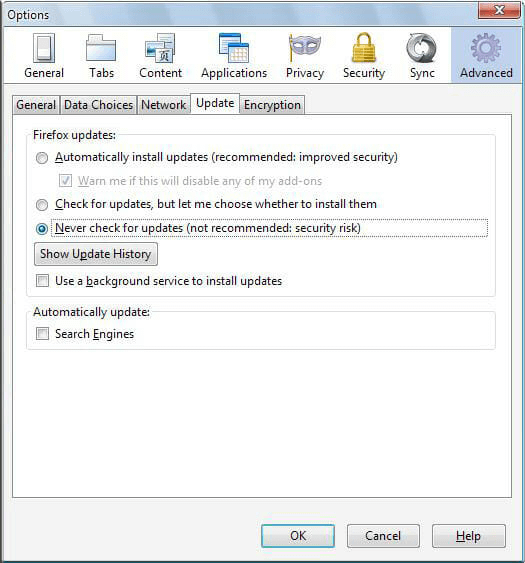 As you may have noticed, Firefox can sometimes interrupt different plugins with an automatic update. If you do not want any unforeseen irritation from an automatic Firefox update, – we require that you do not allow it to update on it’s own.
All you need to do is Freeze Firefox, and everything is as it once was, and all of your favorite plugins, including ours of course, continue to work just fine. Click the image on the left to see how to Freeze your Firefox. Note the check box that says “use a background service to install updates” must also be unchecked as well, or the sneaky buggers will update you anyway.
After 🦊 Firefox 42 64-bit or Firefox 42 32-bit, they changed their structure, so we cannot use the the built in database to store settings and posts. So, as a result, all CraigslistSoftware requires 🦊 Firefox 42 64-bit or Firefox 42 32-bit. You can just install it right over top of your current Firefox and you’re ready to go. Install 🦊 Firefox 42 64-bit or Firefox 42 32-bit right over top of your current version, then restart it twice. If you have any questions, contact support. If you removed Firefox before you read the directions, don’t contact support, just go ahead and change to the correct version.
I get a strange error sometimes when it flags:
You might have a plugin that’s conflicting. Please go to the Tools >> Add-ons and click the extensions tab. Now disable every single addon (plugin) that we have not directly recommended and linked to. We cannot test thousands of Add-ons (plugins) from all over the world, and adjust our program each time a conflict is discovered. You can then re-enable each plugin one by one to try to find the culprit. Color tabs for example is one conflicting addon.. but we are not going to be able to list them all here.
My dog ate my laptop, hard drive crashed, bought a new computer, child reset Firefox etc. etc.:
Due to the nature of our software (the more computers it’s on, the more powerful it is), and the nature of many Craigslisters’ (scam, scam, scam), we charge a fee to send you replacement licenses, essentially, you need to buy it again. You agreed to this when you bought it, it’s not in fine print, its right up top in our terms, and license agreement. We also have a clearly visible refund policy on the site. There is a check box that asks you if you agree to this right in the installers, and you must check the box to proceed. You were asked to read, understand and agree before you bought it, NO exceptions!
Everyone wants it on more than one machine. Some people want it on 10 machines. We have heard every story in the book, and dealt with every type of liar, scammer, etc. The fact is, this is a custom robotic software that turns your computer into a robot. Some people buy extra laptops just to put this on. In many cases our software is worth more than the laptop its on. We are not Adobe, we do not charge an astronomical rate for our software to offset all the piracy. We charge very little.
The administration resources it takes to monitor our downloads and administrate them comes at a cost. So, if you mess up your software installation, just factor that in. If you sell your system, factor that in too! We could have charged $250 up front for the course and software. In order to be fair to our members, we charge very little. But those who cause a drain on our resources will need to buy another license to pay for the resources it takes to keep track of their orders and deal with the constant support requests coming in for such issues. So, please be careful with it, you break it, you bought it, again! Look at the bright side, at least it works!
Use the correct Correct Browser 🦊 Firefox 42 64-bit or Firefox 42 32-bit:
As we have mentioned, we support Firefox only. 🦊 Firefox 42 64-bit or Firefox 42 32-bit. This means, you need to download and install Firefox, prior to installing our software. Then, you need to open Firefox, and then go into your email, and open the link we sent you. We want to make sure you are up and running when you purchase the software.We hold the most recent up to date copies of our software on our server only.
How do I find my software, how do I turn this on?
Firefox installs often with the top menu invisible. To show this menu go to any of of the Firefox icons in the toolbar and right click it. Click Menu Bar to expose this menu.
In the Firefox Menu Bar, you can then navigate to the “Tools >> Add-ons” and you will see the App Manager just underneath the Extensions tab. That is 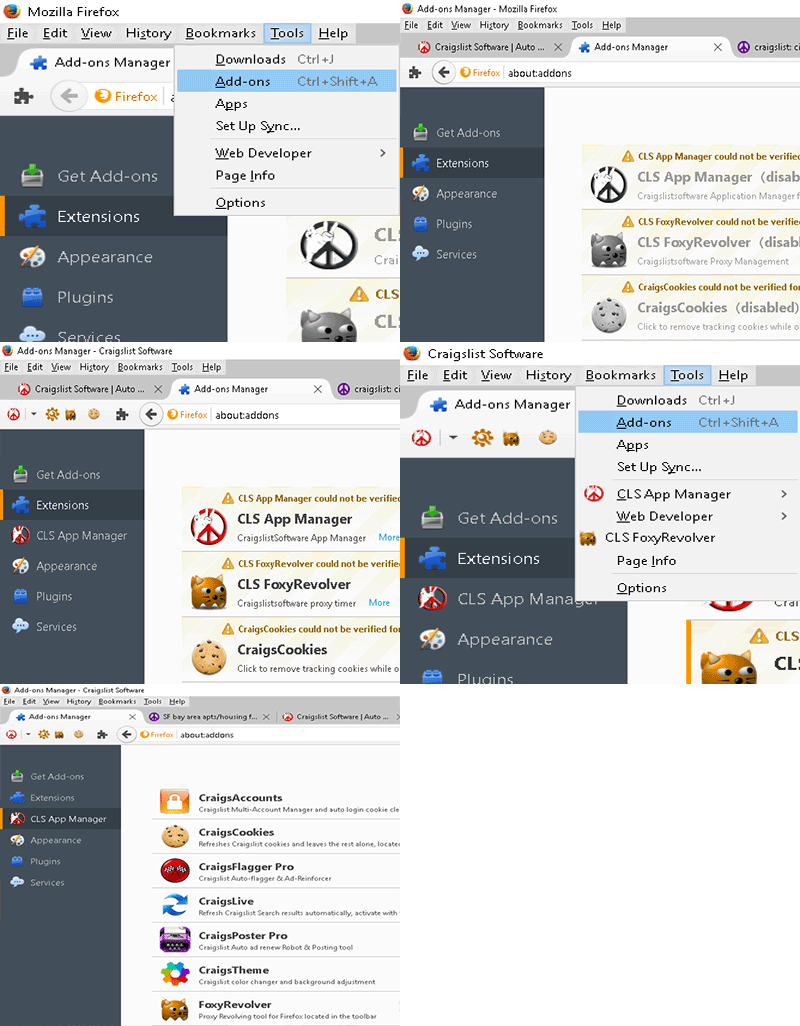 where we install and manage the specific Apps. If the drop down menu on the toolbar says no apps are active, this is because you are not on the proper Craigslist page, and all our apps deactivate when you are not on the applicable Craigslist page they were designed for.
Our software is designed to work with 🦊 Firefox 42 64-bit or Firefox 42 32-bit only. After installation of our software, it is likely that the CLS App Manager plugin is disabled by default. A Firefox Upgrade or reinstallation can also result in disabled plugins. Simply navigate to the “Tools >> Add-ons>> Extensions” and the CLS App Manager plugin will be found there. Enable it if it is not already, and restart Firefox.
Once the software is installed, and the CLS App Manager plugin is activated, you will need to locate the Ghostbusters icon in the Firefox toolbar to access the software interface for settings and such. Usually it is found in the top right corner of the Firefox toolbar. If it is not, click View >> Toolbars >> Customize and look in the bottom of the customize window, and drag out the applicable icon(s), and place it in your toolbar where ever you want. (we placed it on the left in the photos below, beside our two FoxyRevolver icons) Then click “done”. Then click the grayed out Ghostbusters icon (left photo) and authenticate your software by entering your username and password for the members area. You do not need to be logged into the website as well to use our software. If you need to constantly authenticate your software.. it is because you’re constantly deleting all your Firefox cookies, and you should not be touching those cookies, our software regulates your Craigslist cookies for you as it runs cycles, and CraigsCookies manually dumps the cookies for the specific tab only when it is clicked.
You turn individual apps on by opening their corresponding page. When you leave the corresponding Craigslist page that a specific app works within, it shuts itself off automatically so it doesn’t interfere with any pages it shouldn’t.
Where are the other browser buttons I see in the video? How do I get them too?
Those buttons are other browser Add-ons we use. You need to visit our members software page, and see what other supporting software you might need to support your activities. Everything you see in the videos is in there, and much much more. There is a treasure of free software links in there. There is absolutely nothing left out. We use these Add-ons to help us post, edit video and graphics, cookie cleaner, proxy rotator etc. Go through each item and install what you like. We do not support any 3rd party downloads, we just make them available because we find them personally very useful.
Where are the other Apps I have seen around the site? How do I get them too? 
You need CraigsFlagger Pro or CraigsPoster Pro installed to use any of our App Store Apps. If you have a one or both of these already, the apps are now built into your suite.
Your CLS App Manager comes with the applicable pre-installed Apps when you buy it, which ones depend upon your package. There is a significant discount when buying the Trinity Bundle, over buying CraigsFlagger Pro & CraigsPoster Pro individually.
You can navigate to the “Tools >> Add-ons” and you will see the App Manager just underneath the Extensions tab in your Firefox menu. Here you can enable or disable the different Apps as you may need them, or decide to shut them off because they are not being used at the moment. You can always reactivate the ones you have disabled from here.
Do I need different IP’s to remove ads?
To actually remove ads, yes you do, we mention this repeatedly all over the site, before you buy it as well. We make it perfectly clear, that if anyone is claiming to have ad-removal software without multiple IP’s, it’s a scam. There is no way to satisfy the Craigslist server, unless you give it fresh IP’s and trick it into thinking the flags are coming from different local users. Some people wardrive, some people work in an office with many different internet connections. You need to read the proxy tutorial and install a proxy manager such as FoxyRevolver to manage your IP’s, or you can find one for free like Foxy Proxy. You need to see which method is best for you to acquire them. Some people successfully use a service like Hidemyass (HMA). In some cities, this doesn’t work. You need to do the research on this yourself and make a few tests. In each city, it is different, and it can change overnight. This is where you either learn this part, or fail. Any methods we are aware of are posted in the proxy tutorial. Try some things, and see what works best for you. Our software flags automatically. If you have junk IP’s (ie: out of area, banned, or used on the ad more than 4 times), you’re just firing blanks. It’s not that the software doesn’t work, your IP’s are no good, or being used by someone else who already got banned from Craigslist. Get new IP’s, make a VPS, wardrive, do what ever you need to do. No we do not offer any IP’s or Proxies.
I flag and flag, but the ads are still up there, why? What can I do?
Well, you were doing it without really reading anything. And there is the entire problem. On our main pages, we tell you that you might need as many as 4 flags on each ad from over 60 IP’s. We also tell you that you need clean fresh IP’s. We also go on to tell you in the proxy tutorial, that there needs to be a separation in your IP’s, a new subnet, not just a slightly different ip. So, what you can do, is slow down, and read through our resources before trying to remove ads. you’re just firing blanks, obviously. You need to re read the home page, then the FAQ, then re read the entire members section like it means something to you. Please re read the proxy tutorial, and make some phone calls and visit other proxy websites to get some perspective. Don’t waste your money, proxies can be a big scam too. Fake junk proxies, blown IP’s over used on Craigslist already and the resellers know it. Try things, don’t spend a lot of money. We use a combination of methods, including HMA and a VPS. No, sorry we do not get into VPS setups, but you can find people that do in minutes by googleing it. Many people have had some degree of success with HMA if they have IP’s in your area. This is good for flagging if it works for you, but not usually for posting. Using a VPS for posting is the only reliable way to go.
I’m being flagged off in minutes, how do I stop this right now?
You are soft-blocked. You need to read the tutorial on ghosting, and believe and understand what’s written. Your activities have marked your account as an undesirable. Step one, get a pixel ad-tracker account (if you’re posting in a section that still allows HTML – if not skip this step), and create a tracker, and embed this in your ad so you can see how many or how few flags it takes to bring you down. Step two, change everything. New account, new phone number, new ad. (yes it takes a bit of time to play this game now) Create a picture ad in paint if you don’t have Photoshop. Put all your details in that. Upload it to Craigslist. Change your title. Now watch how many flags it takes to bring your ad down. It’s nearly bulletproof again. Step three, read this members section very carefully, especially the ghosting section. The slightest mistake will migrate your soft-blocked settings to your new account. They want to trick you and defeat you by making you think its your competition flagging you, not Craigslist soft-blocking you. It’s a mind game they play. It’s Craigslist’s spam bots or admin lowering your flagging threshold, no question about it.
How do I use the Reinforcer features?
If you have purchased “Reinforcer” or “CraigsFlagger Pro” you will have the Reinforce flagging function. This function is used to flag your own ads in a separate tab so you can cancel out some negative flags. Reinforcer works by changing the visitor to flag ratio of your ads. If you’re getting flagged terribly and someone attacking you seems to have access to enough IP’s and automated software to kill your brand new accounts.. Just open a new tab, and search Craigslist for your ads. When they come up, click the little box beside all the ads that are not yours. That will make them disappear from that page so you can Reinforce only your own ads. Be sure to select the small radio button option “Reinforce”. Now click flag forever. You can use this method to strengthen your new ads with artificial traffic by this method. Extra IP’s are not required to do this.
When do I use the cookie cleaner to remove my cookies?
Our programs manage the cookies for you, don’t touch them or your flagger wont work correctly!!
If your suite includes CraigsAccounts, this wipes all the login cookies each time you open the login page automatically.
Only manually clear your cookies if you do not have CraigsAccounts when you are on your Craigslist account page before you login to post. Clear your cookies if you are logging in from multiple IP’s and multiple accounts and or different  cities. When you are flagging, our software takes care of all of the flagging cookies. If you interfere with it, you will not be flagging at all, it will not work, those flags will not count in their database. Our software knows which cookies are bad, which ones are needed and is programed to replace the bad ones with good ones automatically and at the correct moment. I repeat, if you interfere with our automated process and keep clearing the cookies while flagging, you will flag NOTHING!
Yes, but I just want to get started and flag, what’s the quickest way? I don’t have much time.
Ok, the quickest way, is lose the scratch and win attention deficit attitude. You bought this course, so read it. If you read just enough to get this far with your new auto flagger, you’re  not going to achieve desired results. This is auto flagging software, not auto ad removal software. You need to learn how to aim and fire this thing, or you’re just shooting thousands of blank flags all for nothing. We explained very clearly on the cover page, you need to find a suitable method of acquiring fresh IP’s. To accomplish this, most people are turning to proxies. Now you need to find out how to get them through various methods, and go ahead with that. We present many options, and solutions and provide a unique set of free proxy tools which help to ease the process, test them, and auto add them into Foxy Revolver..
This software and course is not the easy button, it’s the only button. If, we were setting up VPS and other proxy services for our members, Craigslist would infiltrate us, and manipulate our entire member’s group. We need you to learn to do this on your own, and hire someone to assist you if you cannot create a VPS, so they can’t swoop in and ban all of our IP’s. If we had the perfect solution, they would adapt their systems to exclude us and our members. We needed to introduce a random factor that is unstoppable when properly adjusted. Guess what that is? Its you, our secret component in this system is an army of well paid Craigslist warriors adapting and sensing conditions on their own. Send us your success stories and cautionary tales if you like. But we don’t put everything up here. This is why we don’t have a silly blog. Craigslist would sniff out all of your cool new methods, and slam the doors in your face before you had time to cash in. This is to protect all your interests. You need to be a randomizing component in this system. CraigsFlagger Pro and CraigsPoster Pro already have technology built in to disguise your use of them, all you need to do is provide a clean non-abused ip.
I want to put this on more than one machine, how do I do that?
Just click any applicable link or package in or store. We have economic multi-licensing options for many of our programs and our windows Trinity bundle. If you have bought CraigsFlagger Pro and CraigsPoster Pro individually, ask support if they can throw in FoxyRevolver if you would like to purchase the complimentary piece of software, we can probably do that for you.
How do I contact support, what is the best time?:
You can reach us here, and you can send your mails when ever you like. Our staff does their best to serve you as fast as possible. Sometimes we are able to assist you outside of business hours, and if we are here we will. If we are unavailable, please be patient. 
It is our goal to work with everyone as partners in our effort to make Craigslist profitable for us all, and that begins by taking responsibility for your own learning curve. We cannot have our staff read the tutorials to you.
Read our tutorials and become tech savvy. Those who are, will rule Craigslist, in what ever form it evolves into. And yes, it is ever evolving. Those who can begin to understand what is currently going on, will be able to adapt their skills to all other online communities and social media as this unfolds. A couple of guys with a rented U-haul truck can clear 40k per month in the right town just from Craigslist alone. Learn this craft, and get in on it now.
We need our support staff to be dealing with technical support. The members area is for the methodology required to make the software perform optimally. If there is truly something that we have not addressed in the members areas that is limiting your ability to use our software, please do let us know, and we will amend our tutorials. If you have a testimonial or a great suggestion, we would be glad to hear it as well. We are constantly updating the members section with new scripts, cool software, videos and more elaborate tutorials. We are also constantly working on our flagging and posting software to create the best Craigslist experience for our members and bring you the latest greatest ideas from our crew. Please enjoy our member’s area, and become a permanent part in your own online financial solution.
Thanks very much for your patience, support!
Frequently Asked Questions & Answers
Where are my updates, and when do I require them?
We address any defects in our software as fast as possible. If Craigslist changes their site for any reason, we cannot predict this and it will take just a bit of time for us to adapt to their new code. We appreciate your patience when this occurs, you’re welcome to drop us a quick note if your software stops functioning and your built in update feature is not fixing the issue. You will not be charged for the updates, this is free of charge. Ghostbusters Membership is included free. When it’s been broken or updated, we will post a notice to update on the main Welcome page of the members section A.S.A.P. No news is good news, you don’t need to email and ask.
I can’t grasp all of the topics here, can I get a refund?
You were given the opportunity to read our site before hand, and our refund policy. If you paid for university, and flunked out, do they give you your money back? Of course not. If you read a book, do you return it to the store and get a refund? This isn’t the library. The free advice, software, tutorials and videos openly presented in the members section is far more than anyone else, anywhere else is handing out. Our paid tutorials and software are just that, paid. If you’re reading this, there is no way to return our products.
How do I get an Upgrade and get a better version?
Just visit the store and purchase the version you would like, and install it right overtop of the old version. Add as many apps as you like, it all goes into the CLS app manager and adds the new features automatically.
Why isn’t this working?
Support requests with “why doesn’t it work??”, are unhelpful when support needs to determine the issue. When you contact us, please be descriptive. Our CraigslistSoftware works, or we wouldn’t go into all of the bother developing such an elaborate members section to support our clients in their Craigslist endeavors. You either have bad IP’s, or you are not switching IP’s after every four flags per ad. We apologize, but we just don’t have the resources to personally coach and tutor each client by email one question at a time. This question is answered very precisely with our proxy tutorial.
A paid membership doesn’t mean we have operators standing by every time someone hits a snag with Craigslist or google until they finally decide to follow the instructions on our site. We are teaching people to fish here, not handing out smoked salmon. The less silly emails we have to bother with, the faster we can improve our members section, and develop supporting software such as the proxy servers we are working on to help solve the proxy problem permanently for hard to find situations. For this reason, it is important to the entire group, that you find your solutions within these members pages. If the flagger is not removing ads, if that is your goal, you simply have bad IP’s, or too few of them. It’s as simple as that..
But how do I really know if the software flags ads at all?
 That is very simple. By default, we ‘hide’ the opening and closing of each ad so more work can be done by the script, rather than use huge browser and display resources opening and closing windows for each flagged ad. In the top left corner of the screen on any Craigslist page where the flagger is active, you will find a small widget. You can check the small box to display the ads as they are being flagged, or hide them to conserve browser resources. You can even set the flagging mode to reinforce, and sit back and watch a slideshow of all of the ads you targeted to scope out the competition in Preview mode.
My software stopped functioning, but I can login to the members area, why?
We sell licenses for 6 month terms. If you have purchased your software before Tuesday the 14th of April, 2026, then you need to repurchase your license from the store. We have had this policy since the beginning, and it is applicable whether or not the client has taken the time to read the license and these guides or not. Support & membership expires with the license as well after 180 days.
You can see our flagger in action as it flags the ads. If the ad doesn’t come down, you have a clean IP deficiency. Be sure to read the Proxy section.


- ⚡ Desktop Extension Requirements: Chrome, Yandex, Opera & Windows, Linux, Mac.
- ⚡ Android Extension Requirements: Yandex, Kiwi & Android Phone or Tablet.